Translate Video to English and Keep Subtitles in Sync
To translate video to English without disrupting its timing, keep the original audio and add translated subtitles unless you have a clear reason to dub the voices…


Your credits
Your exports are included on this account — nothing is deducted.
Free exports left
This tool
Recent activity
Nothing yet.
Every tool is paid in credits, except the link downloader. With Pro or Studio, the non-AI tools are included. File analysis, settings and previews stay free.
How credits are countedTurn a clip recorded in English or another language into a Spanish-speaking version, with Spanish subtitles produced alongside.
This tool is being improved
Explore other toolsDaily limit reached
Drop your file here
Fetching a video from a link can take longer than uploading a file — up to a minute or two for a long video.
Your file is kept — processing resumes automatically.
This limit resets tomorrow. Go Pro to never hit it again, on every tool.
Your file is kept: processing resumes where it stopped.
Your file is kept: processing resumes where it stopped.
One job at a time. Yours finishes, then this one starts.
Drop to upload
Drop your file here
Or use the other entry, it stays available.
MP4, MOV, AVI, MKV, WebM
Drop your subtitle file here
Drop to upload
Convert to:
Translate to:
SRT, VTT, ASS, SSA
Platform
Duration
Free account required to use this tool. Sign up in seconds!
Preview unavailable for this video. You can still start the enhancement.
Pick two different languages to start dubbing.
The sample plays in the target language so you can compare before starting.
Keep original voice underneath
Low volume, behind the translated voice.
Choose the output format
MP4 plays everywhere. Change it to fit your need.
Subscribers get priority.
It's ready
This stage works through the video end to end. The percentage will only move once it's done.
Estimate: this is the longest step. The bar moves along a measured average duration, not an exact percentage.
This is the longest stage of the job. It is moving, even when the number isn't.
Cancel now? The work already done will be lost and the file will have to be uploaded again.
Get an email the moment it's ready.
Video on its way
It will appear here as soon as it's ready.
Hashtags copied to clipboard — paste them in your post!
Was Klipa useful? Give us 30 seconds back — leave a review on Trustpilot.
Was Klipa useful? Give us 30 seconds back — leave a review on Trustpilot.
Was Klipa useful? Give us 30 seconds back — leave a review on Trustpilot.
Subscribers get priority.
Get an email the moment it's ready.
Cancel now? The work already done will be lost and the file will have to be uploaded again.
This is your video exactly as it will be downloaded.
What is wrong with it?
Still too dark?
We start again from your original video and brighten it further. No credits used.
Want a sharper picture?
Free trial on 10 seconds of your video. You only pay if you like the result.
Cut this video into several clips for your social media
Klipa’s AI does it for you: it finds the best moments, reframes them vertically and adds subtitles. Just tap the button below.
Was Klipa useful? Give us 30 seconds back — leave a review on Trustpilot.
Keep your videos between sessions and get free credits for your next exports.
Preparing your logo-free video… The download will start on its own.
Preview ready — the conversion works
Clean file, no watermark
Convert this whole video
Your free plan hit its burn limit this month. Your settings are saved — unlock this result or go Pro to burn now.
Some versions or subtitles could not be produced. Only successful files are available.
We're preparing your logo-free videos…
We couldn't prepare your logo-free videos. Write to us — your purchase is safely recorded.
/10
Cut this video into several clips for your social media
Klipa’s AI does it for you: it finds the best moments, reframes them vertically and adds subtitles. Just tap the button below.
Was Klipa useful? Give us 30 seconds back — leave a review on Trustpilot.
Longer videos and larger files with Pro.
Your original video is still available. Try another tool:
Your file is ready. Here's what Klipa Pro adds:
Why remove the logo?
From 4 videos bought one by one, Plus costs less
Which clips do you want to download?
Your download starts on its own as soon as it's ready.
Exporting the clip failed. Please try again in a moment.
Spanish is the language many online audiences are looking for when a creator, a shop or a school wants to grow beyond English. A subtitle line helps, yet plenty of viewers would rather simply hear their own language. Klipa's translator takes the video you upload, writes out what is said, translates it into Spanish and reads it out in a synthetic voice. A Spanish subtitle file is delivered at the same moment.
You keep your footage exactly as it is. The tool replaces the speech with a Spanish voice, line by line, each one placed at the time the original line started. Spanish often needs more syllables than English for the same idea, so a line can run past its slot. When that happens the speech is tightened a little, inside a fixed ceiling, rather than chopped off, and the last line is allowed to finish, with the video extended by a few frozen frames if needed. The image is left alone, so there is no lip-sync either.
Spanish is spoken by one of seven named synthetic voices, each with its own tone: a neutral one, and three of each gender. Select a gender, pick a voice and press Listen: the sample plays in Spanish, so you can compare before the full run. None of them clones your voice or reuses a recorded actor. If your footage has music or room sound worth keeping, an option leaves the original audio running quietly beneath the Spanish.
The subtitle file in Spanish is built from the same translation and carries the same timestamps as the dub. Publish it alone on a video that keeps its original audio, or together with the Spanish voice. This matters for audiences who watch with the sound off, or on platforms where imported captions display poorly. If what you need is a written transcript of speech that is already in Spanish, the AI transcription tool is the better fit; here the written result is the translated subtitle file.
Leave the source language on Auto-detect or set it yourself. The video has to be an uploaded file in one of the common formats, since a pasted link is not accepted. If the speech is already Spanish, the run stops right after the transcription, before translation and voice, and your credits come back. Every language pair costs credits, counted by minute of source and by target language, so a short test clip is the cheapest way to hear the result.

Choose a video file that contains speech; the usual formats are accepted. The spoken language is picked up automatically, though you can set the source language manually if you prefer.
Keep Spanish as the target language, decide between male, female or neutral, open the list of voices and press Listen. The sample plays in Spanish. Tick the box if the original sound should remain underneath.
When processing ends, download the clip with its Spanish voice and the matching subtitle file. Use either one by itself, or publish both, according to the platform and the habits of your viewers.
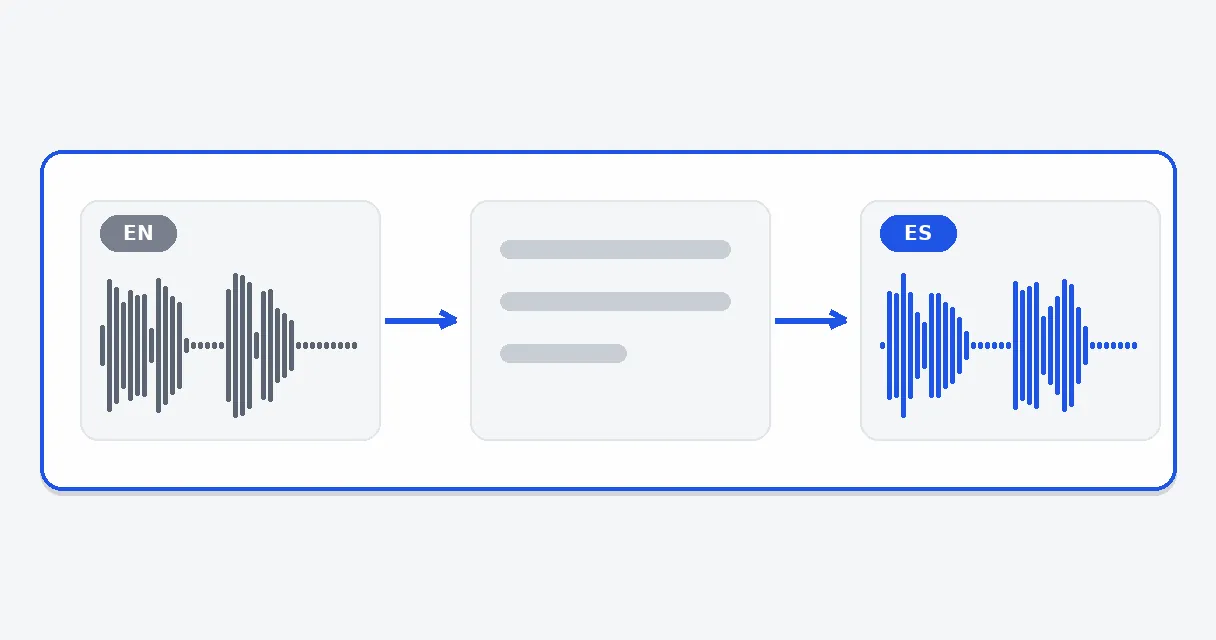
Writing out the speech, translating it and recording the Spanish are chained for you. You do not export a transcript, move text into another site and then look for a voice generator. One upload produces a Spanish dub and a Spanish subtitle file that match each other in timing.
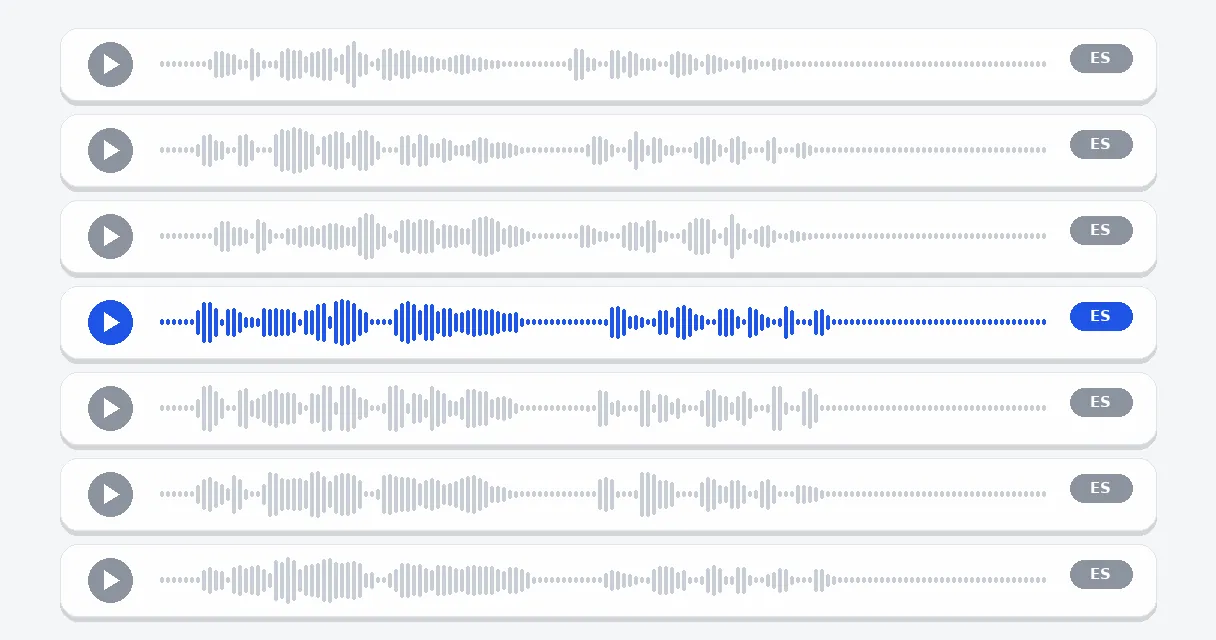
Seven synthetic voices are on offer: one neutral, plus three of each gender, with tones that run from measured to warm to energetic. The Listen button plays a short passage in Spanish, so the choice is made by ear before the full translation. These voices are not clones of anyone and not recordings of an actor.
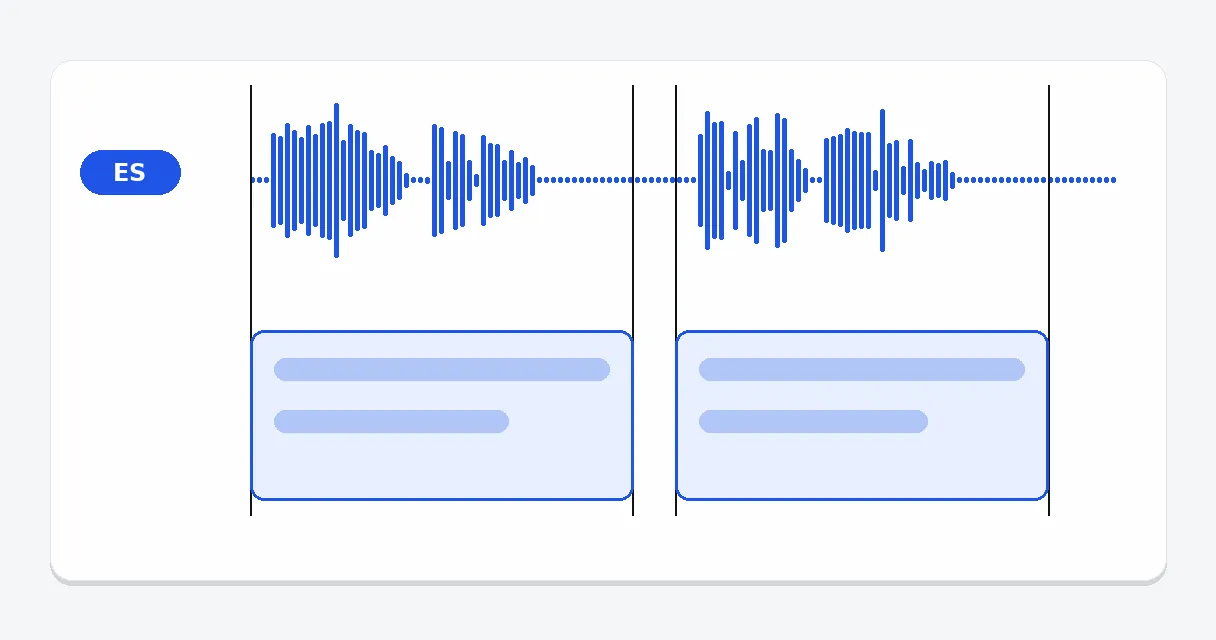
The Spanish subtitle file shares its timestamps with the new voice, so text and sound agree. Post it on its own for viewers who read, or keep both for everyone else. It is a separate file, which leaves you free to use it wherever the platform allows imported captions.
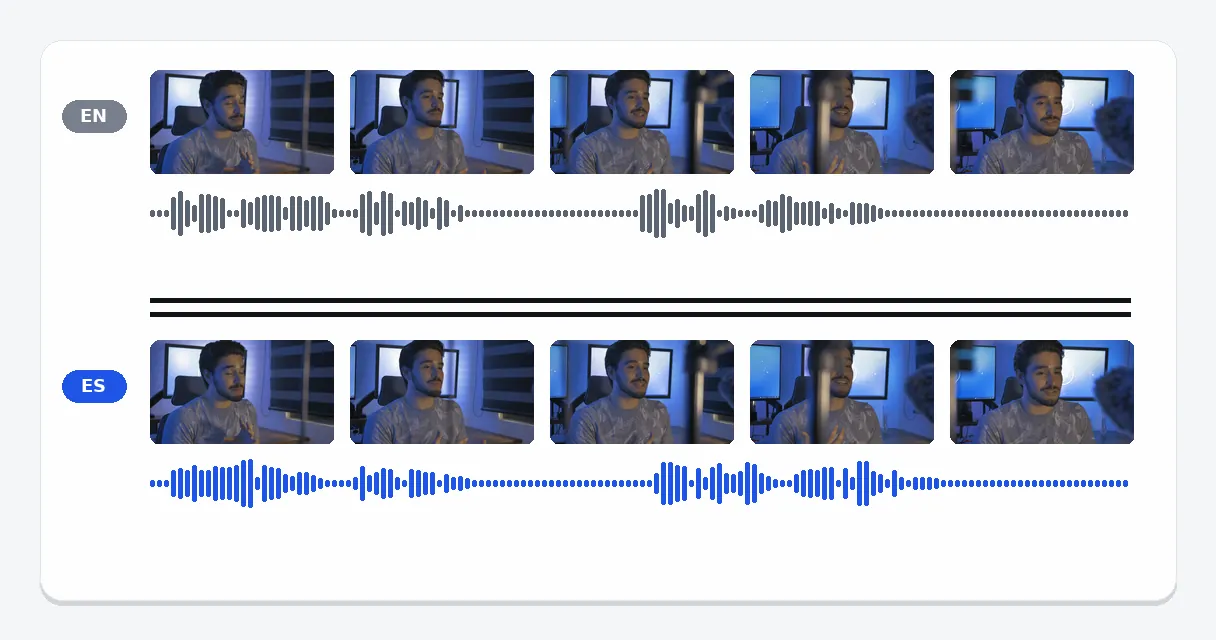
Only the audio track is replaced. Faces, cuts, graphics and framing are exactly those of your original footage, which is why the mouth of the speaker will not follow the Spanish words. In exchange, nothing in the image is altered, and the original sound can stay faintly underneath if you wish.
A shop or software company with an English demo gets a Spanish edition for customers in Spain, Mexico or Argentina without a second shoot. Pacing, message and cuts remain the same; only the audio and the captions are new.
A creator publishing in English can add a Spanish version of a popular tutorial, rather than hoping viewers will switch on captions. The original stays online as it is, with the Spanish edition posted next to it.
A lesson recorded in English becomes a Spanish one that follows what is shown on screen, so students listen instead of reading while a diagram changes. A teacher can build a second edition without recording the class again.
Colleagues who speak Spanish can follow an internal update, a training recording or a screen demo in their own language. Use it for material you own or are entitled to reuse, not for other people's content.
A holiday film, a toast or a birthday message recorded in English can reach Spanish-speaking relatives in sound and in writing. It is a one-time need that rarely calls for a professional translation service.
Yes. Upload the clip, keep Spanish as the target, choose between male, female or neutral, select a voice and play its Spanish sample. Start the run and collect the dubbed clip once it is ready, with its Spanish subtitle file. No studio, no actor and no manual subtitle export is involved.
Klipa runs that whole sequence on the file itself: transcription of the speech, translation into Spanish, a synthetic voice timed to the picture and a subtitle file. Nothing has to be copied from one tool to another or assembled by hand. One upload goes in, one Spanish result comes out.
This tool is paid in credits. 20 credits are offered to try the tool. A Pass or a Pro plan delivers it without the logo. Expect no unlimited free use; a short clip is the sensible first test of the voice and the subtitles.
Speech is written out first, then translated into Spanish, and each translated line is voiced and placed where its original began. A line that runs long is tightened slightly, inside a fixed ceiling, instead of being cut, and the final line is always kept whole. Everything else in the clip stays put.
Yes, and it is among the most frequent uses. Upload the advert, choose Spanish and a voice, and download an edition that preserves the message, the tempo and the editing. Spanish is offered as one target language, with the same seven voices as any other. Run it again with another language for further markets.
This tool outputs a translated subtitle file next to the dub, which is Spanish text with timestamps. For a plain transcript of speech already in Spanish, the AI transcription tool on Klipa is designed for that job and avoids producing a voice you do not need.
Yes. The settings offer male, female or neutral, and inside each option you choose one of the named synthetic voices. Play the short Spanish sample before launching the whole translation, so that the tone suits your clip. These are catalogue voices, not clones of yours.
Right after transcription the tool recognizes that the clip already speaks Spanish, so it halts. Nothing gets translated or voiced, and the credits charged for that attempt go back to your balance. Try another file, or switch the target language.
Yes, a Spanish subtitle file is generated with the dub, with the same timestamps, as a separate download. Publish captions alone, the Spanish voice alone, or both. Captions help viewers who watch silently, and they cover platforms where the dubbed audio is not wanted.
Allowed length is tied to your plan, whichever way the file arrives. Credits scale with the minutes of source and with the target language, which makes long recordings costlier. If one passage is all you need, trim the recording down to it before uploading.

To translate video to English without disrupting its timing, keep the original audio and add translated subtitles unless you have a clear reason to dub the voices…

Imagine opening a clip recorded in Portuguese, watching it with clean English subtitles, and uploading the same video to TikTok without a single ‘file too large’…

You just uploaded your latest masterpiece to YouTube. A few days later, a comment pops up in Spanish, thanking you for the video. The weird part? You don’t speak…
A Spanish edition no longer takes a studio week. Upload the clip, listen to a voice, and publish the Spanish dub, the Spanish subtitles or both, whichever fits your audience. If your goal is only the words on paper from speech that is already in Spanish, the AI transcription tool does that directly. And for the reverse trip, from a foreign-language recording into spoken English, use the English version of this tool, which has the same settings and the same voices.

Signing in…