

Skip to content

Make your video play faster

Shorten a long recording by playing it twice as fast or more.

This tool is being improved

Explore other tools

Daily limit reached

Drop your file here

Browse
or

MP4, MOV, AVI, MKV, WebM

0 / 1000

Drop your subtitle file here

Browse

SRT, VTT, ASS, SSA

AI
0 / 1000
Examples:

Platform

Duration

Audience & tone Optional
AI is writing your script…

Free account required to use this tool. Sign up in seconds!

Video duration
Minutes required
Minutes used / limit
Minutes remaining
Estimated balance after (min)
This video deserves better than a blurry copy. Much better quality is available — unlock it after your free download.

Source language
Target language

Pick two different languages to start dubbing.

Voice

The sample plays in the target language so you can compare before starting.

Keep original voice underneath

Low volume, behind the translated voice.

Duration :

Tap the person to keep in frame

Preview

Target format

Want a smaller video file?

Custom size (pixels)

× px

Framing

Person to follow

Background

More settings

Fixed frame

The camera doesn't move within a shot

Stabilize the picture

Reduces shaking — visible on the final video

Keep the black bars

By default, they are removed automatically

Stretch to fill

Nothing is cut, the picture is stretched

Split screen when two people talk

Each one gets half of the screen, top and bottom. Off: a single frame follows whoever is speaking.

Resolution

Automatic: the best quality your plan allows

Uploading background…

Transparent export (ProRes .mov with alpha). Reserved for the Pass or a Pro plan; the preview shows on a checkerboard.

Drag · resize · rotate
Placement
Text
Logo / Image
Common settings
→
optional

Length of the final edit

What you are looking for

Optional

If you write it, this takes precedence over the general criteria.

Optional

Guides passage selection. Your brief remains the priority.

Output Format

Split screen when two people talk

Each one gets half of the screen, top and bottom. Off: a single frame follows whoever is speaking.

Subtitles included

Subtitle style

Extracting the speech… the subtitle preview will be ready in a few seconds.

No speech detected in this video: there are no subtitles to preview.

Preview is currently unavailable. You can generate clips with subtitles enabled; any failure will be reported.

Subtitle preview is temporarily unavailable: its daily allowance has been reached. You can still generate clips at the usual analysis price.

Sign in to your free account to preview subtitles.

Cut intensity

What to do with silences

Transition

Also

Remove hesitations too

The “um”, “uh” and false starts

Clean up background noise

Hiss, air conditioning, street noise

Keywords (optional)

Rotate or mirror the video to enable.

Choose the output format

MP4 plays everywhere. Change it to fit your need.

Get an email the moment it's ready.

Video on its way

It will appear here as soon as it's ready.

Hashtags copied to clipboard — paste them in your post!

Was Klipa useful? Give us 30 seconds back — leave a review on Trustpilot.

Was Klipa useful? Give us 30 seconds back — leave a review on Trustpilot.


Was Klipa useful? Give us 30 seconds back — leave a review on Trustpilot.

Before After

Format Length Size Quality Saved Time removed Cuts ✓ Logo-free unlocked for this video

Subscribers get priority.

Get an email the moment it's ready.

Cancel now? The work already done will be lost and the file will have to be uploaded again.

This is your video exactly as it will be downloaded.

What is wrong with it?

Still too dark?

We start again from your original video and brighten it further. No credits used.

Want a sharper picture?

Free trial on 10 seconds of your video. You only pay if you like the result.

Was Klipa useful? Give us 30 seconds back — leave a review on Trustpilot.

Preparing your logo-free video… The download will start on its own.

Subtitles (.srt) separate file

Free Google 1-click No credit card
Understand first

Fast forward a video you have already recorded

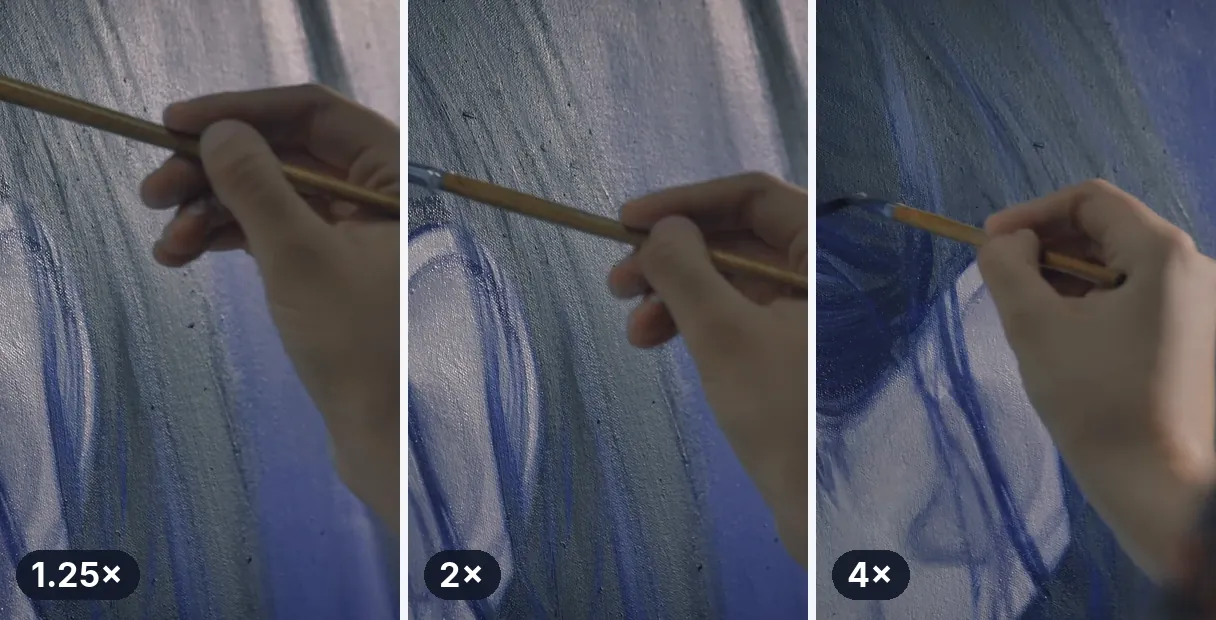
A thirty minute tutorial, a long drive, an hour of someone painting a wall: the footage is good, the pace is not. Playing it faster is the quickest way to give it back its rhythm. Add the file, pick a speed, and the whole video plays faster from the first second to the last, with its sound.

What 2x really gives you

The slider opens on 2x, double speed, so a ten minute recording becomes five. It goes up to 4x, which turns ten minutes into two and a half, and it can go back down if you overshoot. The page does one simple thing: it plays the video you uploaded at a different pace and gives you a new MP4. Nothing is added, and nothing is invented.

How the sound behaves

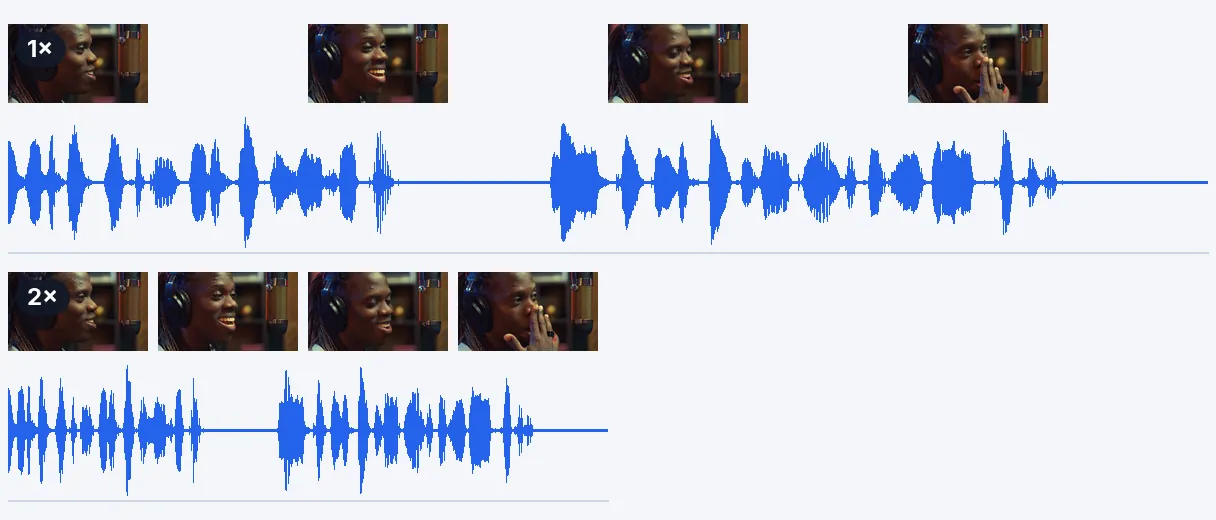
The audio is compressed in step with the picture, so voices and actions stay together. Its pitch does not change, so nobody turns into a chipmunk. There is a natural limit, though: speech stays easy to follow up to about 2x, and beyond that it starts to blur. For a talk or a lesson, choose between 1.25x and 2x; for a silent screen recording or a landscape, 4x is perfectly fine. A video without a sound track is processed silent.

Is it a time-lapse?

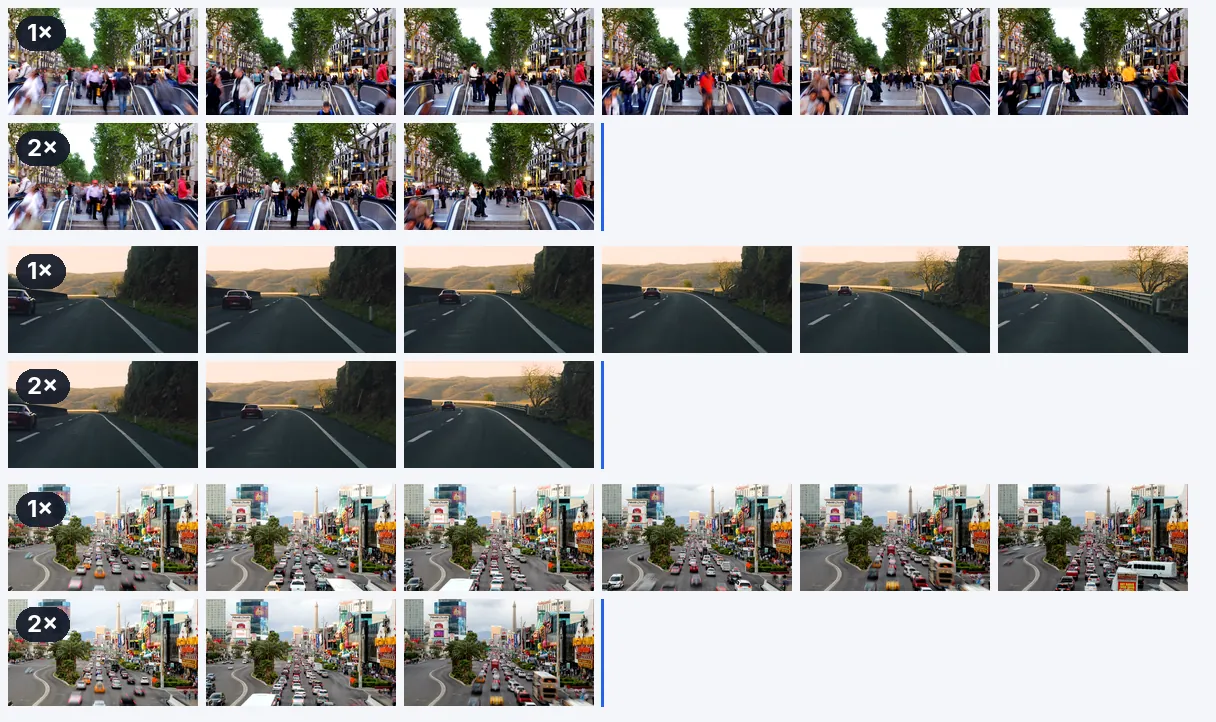
Not in the strict sense. A true time-lapse is filmed by taking one image every few seconds. Here you speed up normal footage, and you get a similar feeling for slow processes such as cooking, drawing or construction. The movement keeps the smoothness of your original recording, since the frame rate of the source is preserved.

Need more than 4x?

The slider stops at 4x.

Only a part of the video?

The speed is applied evenly. To speed up only a stretch, cut that stretch first, change its speed, and keep it as its own clip.

Example result — Speed Up Video Online: Fast Forward Any Clip at 2x or 4x
Proof in the result

What the tool produces

How it works

Speed up a video in three simple steps

Step 1

Add your video

Pick an MP4, MOV, AVI, MKV or WebM file, up to 2 GB. A screen recording, a phone clip or a camera file all work. If the file is very heavy, compress it first.

Step 2

Choose how fast

The slider opens on 2x. Move it to 1.5x for a light tightening, or toward 4x for a fast forward effect. Remember that speech is hardest to follow beyond about 2x.

Step 3

Download the faster video

You receive a shorter MP4 with the sound sped up to match. Watch it through first and make sure the dense sequences are still understandable at the speed you chose.

Why Klipa

Why speed up your video here

Benefit — Speed Up Video Online: Fast Forward Any Clip at 2x or 4x

From 1.25x to 4x

Pick the amount of tightening that suits the content and the audience. A small boost removes the drag from a lesson, double speed shortens a long recording, and 4x gives the rushed look of a fast forward. The slider lets you try each of them on the same file.

Benefit — Speed Up Video Online: Fast Forward Any Clip at 2x or 4x

A sound you can follow

The audio is sped up together with the picture and keeps its natural pitch, so a voice does not rise into a squeak. Up to about 2x, speech remains understandable. If the clip has no audio track, it is simply returned silent.

Benefit — Speed Up Video Online: Fast Forward Any Clip at 2x or 4x

The smoothness of your source

Your clip keeps the frame rate it was filmed at, so a sped-up video does not stutter more than the original did. The picture size stays the same, and the result is an MP4 that opens on nearly any phone or computer.

Benefit — Speed Up Video Online: Fast Forward Any Clip at 2x or 4x

Quick to finish

A video that becomes shorter is also processed faster, since the output is the thing being produced. No software to install, no timeline to learn. You can try it on your real file without creating an account, and see the result before deciding anything.

Real cases

WHAT PEOPLE SPEED UP

Tutorials and online lessons

A lesson recorded in one take has pauses and slow stretches. Playing it at 1.25x to 1.5x tightens it without making the speaker hard to follow, and your viewers finish more of it.

Screen recordings

Installing software, filling in a long form, watching a build or an export run: these recordings are slow to watch. At 3x or 4x, only the progress remains, and a viewer sees the whole procedure in a minute.

Cooking, drawing and making

Kneading, painting, assembling a shelf, planting a garden: speed the long middle part to 4x so the viewer sees the transformation instead of waiting for it. Slow gestures turn into a lively sequence.

Travel and driving footage

A road trip filmed from the dashboard, a walk through a market, a train ride. At 4x, an hour becomes fifteen minutes, enough to show the journey and its landscapes without testing anyone's patience.

Fast forward effects for social posts

A crowd moving, a table being set, an outfit change: a burst of fast motion makes a short post feel energetic. Reserve it for the moments that benefit, and keep everything else at its natural pace.

Continue with

Related Tools

PrepareFetch the video and get the right format
EditCut, clean the sound and the silences
TransformTurn it into short clips, ready to publish
EnrichSubtitles, translation and transcription
Frequently asked

Questions about speeding up a video

Do I need an app to fast forward a video?

Yes. Add your file on this page, move the slider above 1x and download the result. It runs from the browser of your computer or phone, and the page opens on 2x so you can see the effect right away.

What is the quickest way to get double speed?

Leave the slider on 2x, which is where the page starts, then launch the processing. A ten minute video becomes five minutes, and a sixty second clip lasts thirty seconds. The sound is sped up at the same rate, so nothing drifts out of sync.

How do I fast forward a video I filmed on an iPhone?

Add the file just as it is, straight from the phone or after copying it to your computer: iPhone recordings are normally MOV or MP4, both accepted, up to 2 GB. Pick the speed and download the new MP4. You do not need to convert the video beforehand, and the output is a standard MP4.

What if I want it more than 4x faster, like 10x?

Not in one pass: the slider stops at 4x, its upper limit. For a very long recording, removing the slow stretches first with a cutter, then speeding up what remains, usually reads better than pushing the speed higher, and the sound stays easier to follow.

Will everyone sound like a chipmunk at 2x?

No. The audio is shortened without raising the pitch, so voices keep their natural tone and nobody sounds like a cartoon. They get faster, though: up to about 2x speech stays easy to follow, and beyond that it becomes hard to understand.

What does a 30 minute recording come to at 2x or 4x?

Divide the length by the speed you picked. At 2x it lasts 15 minutes, at 3x ten minutes, and at 4x seven and a half minutes. Do the same sum for your own file before processing, to know the final length and decide whether it is short enough for where you plan to publish it.

Is it free to speed up, and is there a logo on the file?

Yes — the first try is free, with no signup. The video downloads with the Klipa logo; without the logo with a Pass or a Pro plan. You can check the speed on your own file before deciding about anything else.

Does this give me a real time-lapse?

The look is similar, the method is not. A real time-lapse captures one image every few seconds. Here you play an ordinary recording faster, which works well for slow tasks such as cooking, painting or travelling, and keeps the smoothness of the original.

I only want one slow stretch faster; is that possible?

The speed covers the entire video. For a single stretch, trim it out beforehand, speed up that piece alone, and either keep it as its own video or slot it into your editing software among the parts you left untouched.

Will the motion stay smooth and the picture sharp?

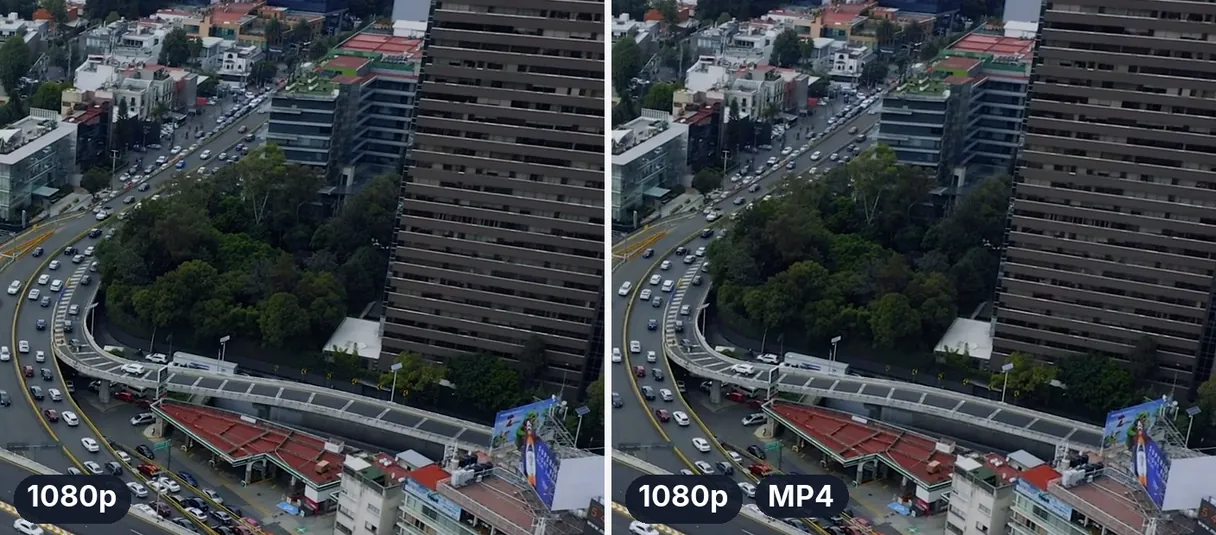
The frame rate of your source is kept, so the motion is as smooth as the original, and the picture size does not change. What you download is a fresh MP4 encoded in high quality, so a faint loss is possible, as with every export.

Your turn

Ready to watch your video at double speed?

Add a recording, keep the slider on 2x or push it to 4x. The first try is free.

You have used your premium trial this month. Upgrade to Pro to keep going with every tool.

No credit card required

In closing

Shorter videos get watched

People stay with a video that moves. Speed is the simplest way to cut dead time: 1.25x for a lesson, 2x for a long recording, 4x for a slow process. When the result is still too long, cut the minutes you do not need, and when you want to send or upload it quickly, compress the finished file to make it lighter. Start with the default 2x and adjust from what you see. A few minutes of testing on a short excerpt is enough to find the speed that suits your footage, your voice and your audience.

All tools