
Convert Video to Shorts for Free in 3 Clicks
At the end of this guide, long footage will be a vertical short clip with tight timing, 9:16 framing, and readable captions—ready to upload to TikTok, Reels, or…


Your credits
Your exports are included on this account — nothing is deducted.
Free exports left
This tool
Recent activity
Nothing yet.
Credits are used by the tools that call on artificial intelligence. File analysis, settings and previews stay free.
How credits are countedOne recording in, a week of short vertical videos out. The original file stays exactly as it is.
This tool is being improved
Explore other toolsDaily limit reached
Drop your file here
Fetching a video from a link can take longer than uploading a file — up to a minute or two for a long video.
Your file is kept — processing resumes automatically.
This limit resets tomorrow. Go Pro to never hit it again, on every tool.
Your file is kept: processing resumes where it stopped.
Your file is kept: processing resumes where it stopped.
One job at a time. Yours finishes, then this one starts.
Drop to upload
Drop your file here
Or use the other entry, it stays available.
MP4, MOV, AVI, MKV, WebM
Drop your subtitle file here
Drop to upload
Convert to:
Translate to:
SRT, VTT, ASS, SSA
Platform
Duration
Free account required to use this tool. Sign up in seconds!
Your Hashtags Are Ready!
Hashtags copied to clipboard — paste them in your post!
Was Klipa useful? Give us 30 seconds back — leave a review on Trustpilot.
Conversion Complete!
Preview below. Download your file whenever you like.
Was Klipa useful? Give us 30 seconds back — leave a review on Trustpilot.
Translation Complete!
Preview below. Download your file whenever you like. Timecodes are preserved.
Was Klipa useful? Give us 30 seconds back — leave a review on Trustpilot.
Your Video Script
Was Klipa useful? Give us 30 seconds back — leave a review on Trustpilot.
Preview unavailable for this video. You can still start the enhancement.
Pick two different languages to start dubbing.
The sample plays in the target language so you can compare before starting.
Keep original voice underneath
Low volume, behind the translated voice.
Choose the output format
MP4 plays everywhere. Change it to fit your need.
Subscribers get priority.
It's ready
This stage works through the video end to end. The percentage will only move once it's done.
Estimate: this is the longest step. The bar moves along a measured average duration, not an exact percentage.
This is the longest stage of the job. It is moving, even when the number isn't.
Cancel now? The work already done will be lost and the file will have to be uploaded again.
Get an email the moment it's ready.
Video on its way
It will appear here as soon as it's ready.
Subscribers get priority.
Get an email the moment it's ready.
Cancel now? The work already done will be lost and the file will have to be uploaded again.
This is your video exactly as it will be downloaded.
What is wrong with it?
Still too dark?
We start again from your original video and brighten it further. No credits used.
Want a sharper picture?
Free trial on 10 seconds of your video. You only pay if you like the result.
Cut this video into several clips for your social media
Klipa’s AI does it for you: it finds the best moments, reframes them vertically and adds subtitles. Just tap the button below.
Was Klipa useful? Give us 30 seconds back — leave a review on Trustpilot.
Keep your videos between sessions and get free credits for your next exports.
Preparing your logo-free video… The download will start on its own.
Preview ready — the conversion works
Clean file, no watermark
Convert this whole video
Your free plan hit its burn limit this month. Your settings are saved — unlock this result or go Pro to burn now.
Some versions or subtitles could not be produced. Only successful files are available.
We're preparing your logo-free videos…
We couldn't prepare your logo-free videos. Write to us — your purchase is safely recorded.
Cut this video into several clips for your social media
Klipa’s AI does it for you: it finds the best moments, reframes them vertically and adds subtitles. Just tap the button below.
Was Klipa useful? Give us 30 seconds back — leave a review on Trustpilot.
Longer videos and larger files with Pro.
Your original video is still available. Try another tool:
Your file is ready, and it's yours for free. Here's what Klipa Pro adds:
From 4 videos bought one by one, Plus costs less
Which clips do you want to download?
Your download starts on its own as soon as it's ready.
Preparing the clip failed. Please try again in a moment.
A long video mostly reaches people who already follow you. Short vertical videos reach the ones who do not, and Shorts, Reels and TikTok all play 9:16, so a single vertical file can travel to all three. Splitting by hand means watching everything, noting where each idea starts and ends, and cropping every piece. Here the splitting is done for you.
A passage works alone when it opens on its point, needs nothing said earlier to be understood, and stops before it drifts. Those are the passages Klipa looks for in your recording, and it returns each of them as a separate short video.
An hour of talk often hides a handful of such passages. Spread them out and one recording fills a week of publishing, with your original kept intact next to the new files. Everything comes from your own footage: nothing is invented, and nothing is published for you.
This page is about the transformation itself. For the detailed controls over goals, instructions and clip count, head to AI Clips.

Upload the file or paste a link: your own YouTube video works, as do links from TikTok, Vimeo, Dailymotion, Twitter/X, Facebook, Instagram, Twitch, Streamable, Reddit, Pinterest, Snapchat, Kick, Bluesky, 9GAG, Odysee, Coub, Tumblr, Rumble. Anything under 60 seconds is too short to split. A free account is required to start.
Keep the default goal or pick Viral clips, Best moments or Key ideas, and add a short instruction or favourite topics. Then choose the shape the videos should take: vertical for phones, or square or horizontal. Captions are on unless you switch them off.
Play each short video, compare their scores and download the ones you want. Run it again with another goal or another shape whenever you like; your original is never changed.
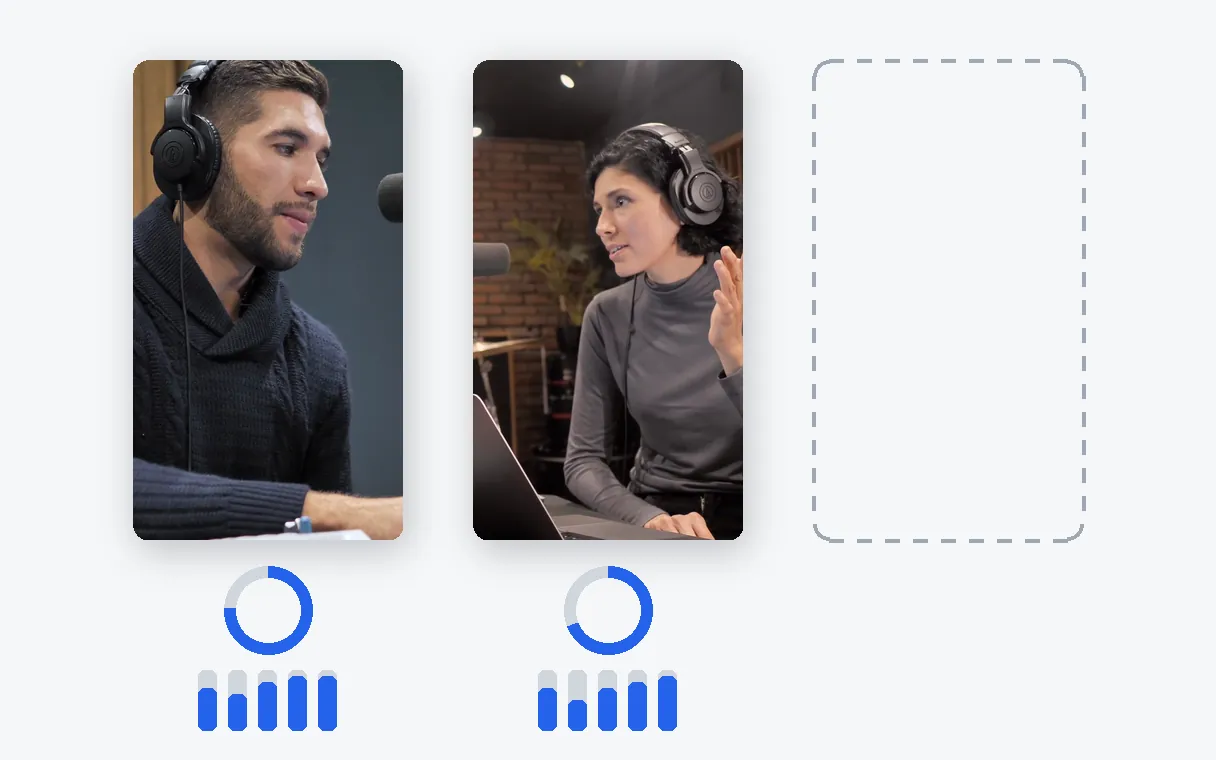
A passage is kept because it holds up alone, and it arrives with a score out of 10 and its breakdown so you can see why it was picked. With only two strong passages in the recording, you receive two short videos and a note saying so.
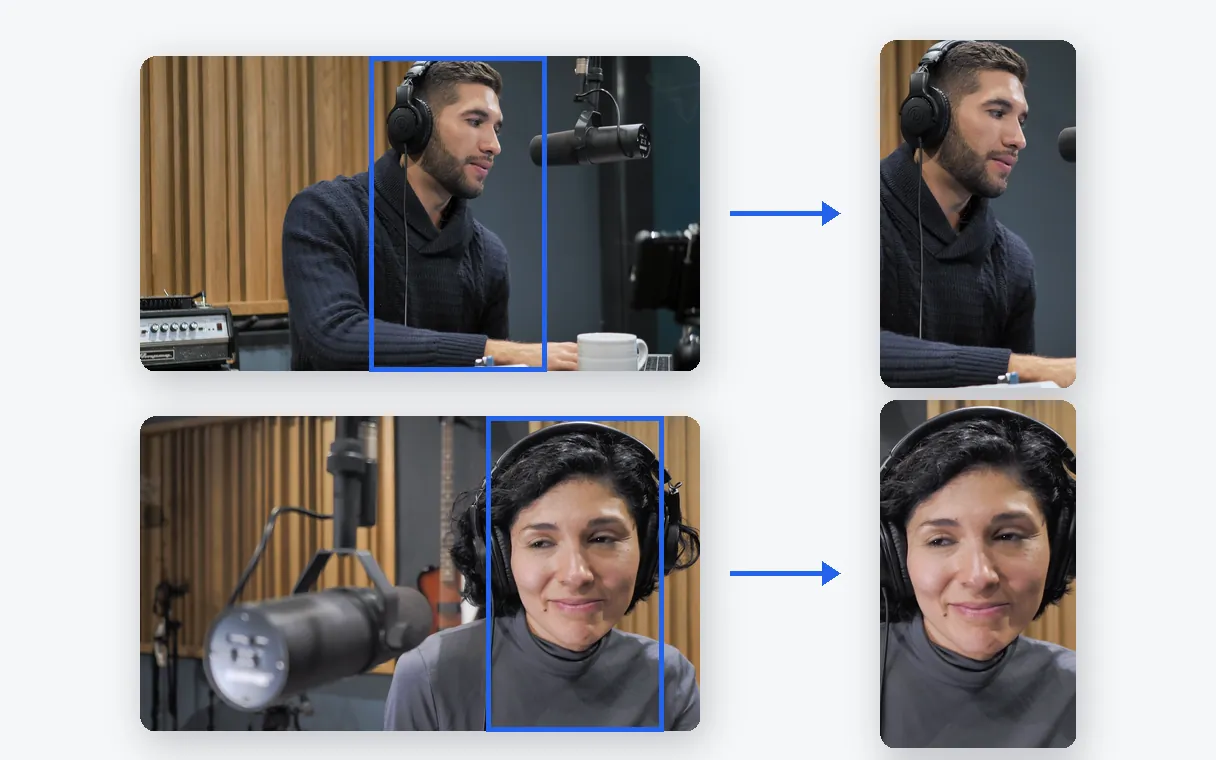
The crop follows whoever is on screen, so nobody ends up half out of frame when the video turns vertical.
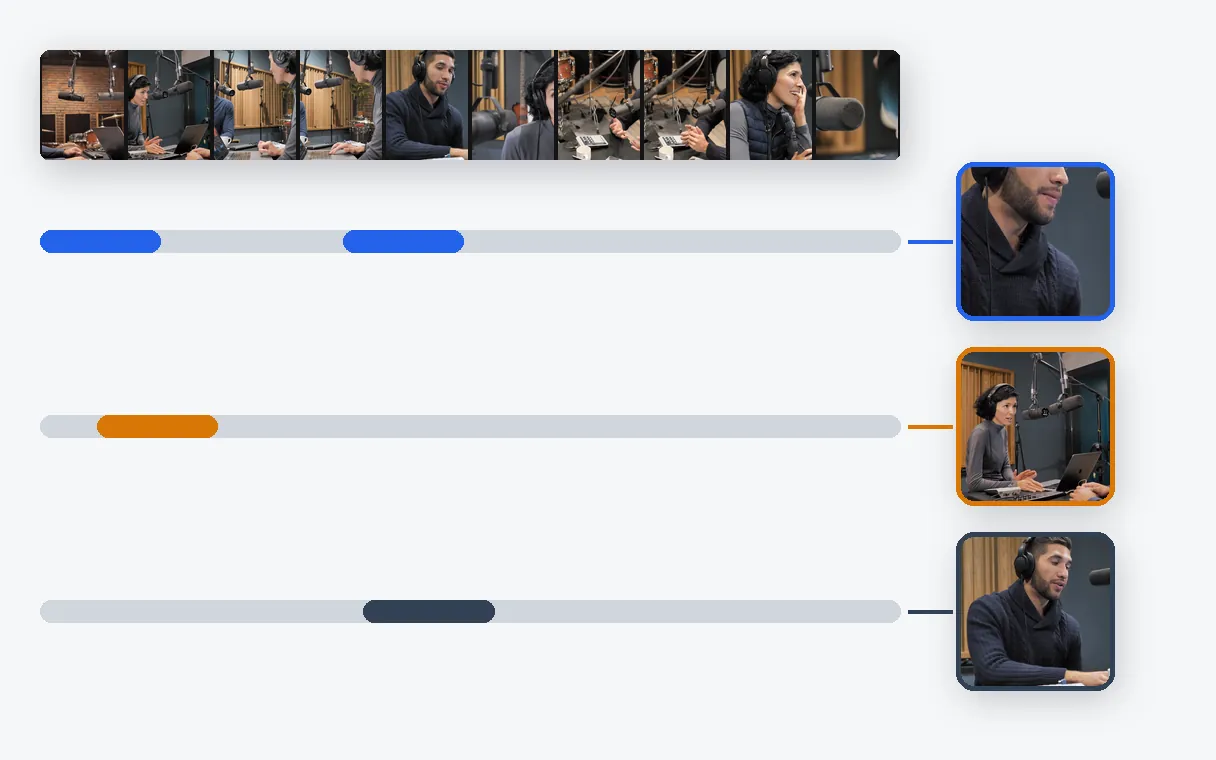
Start over with another goal or a new instruction, and the same recording can yield a different set of short videos. The original file is never touched.
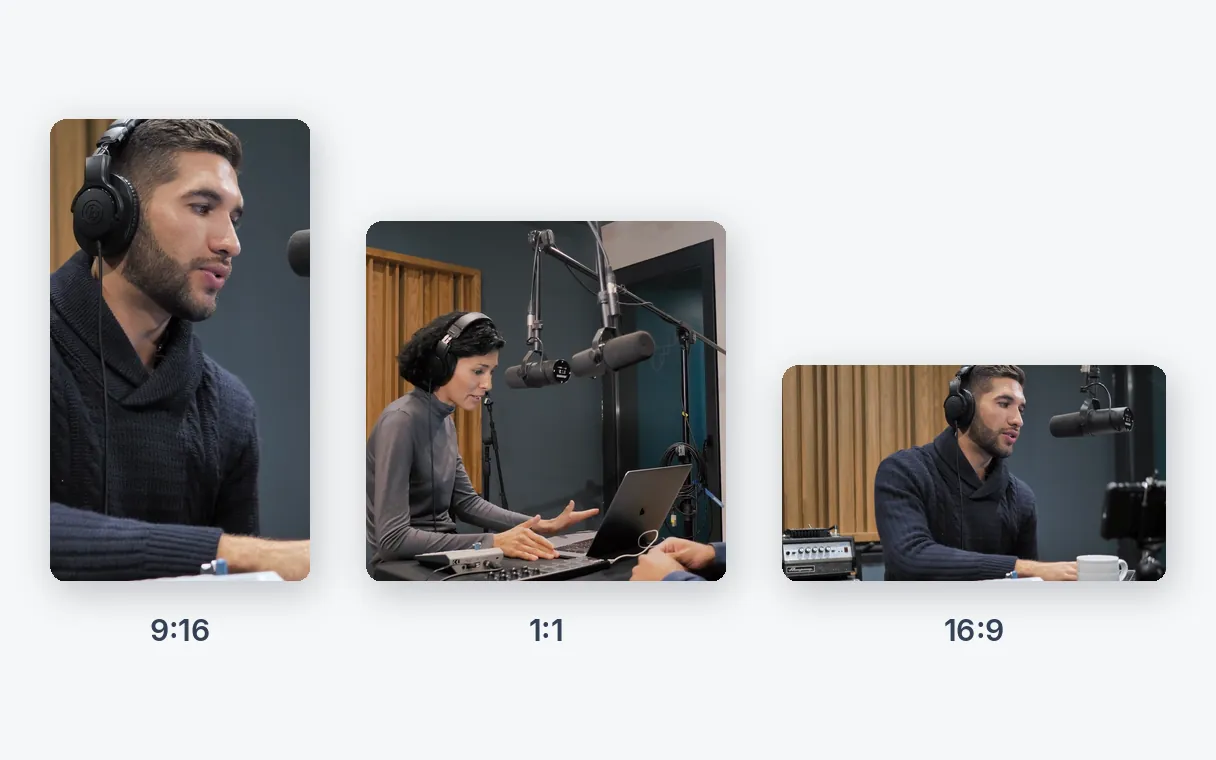
The same recording can come out vertical for phones, square for feeds or horizontal for a website. You pick the shape for each run.
The one answer people quote afterwards deserves its own video, not a place at minute forty.
A lesson holds several complete ideas. Each can become a short video that works as a teaser or a quick refresher.
Long walkthroughs become short videos, one per feature worth showing.
Paste the link of an older video from your channel and give it a second life as vertical posts.
A two-hour show holds a handful of moments worth replaying on their own.
Short vertical videos are what people scroll through on Shorts, Reels and TikTok, and they reach viewers who would never sit through the full recording. One long video can feed many posts instead of a single upload.
Shorts, Reels and TikTok all play vertical video in 9:16, so one vertical file serves them all. Klipa crops your recording to that shape and keeps the speaker in frame. You then upload the files yourself.
Yes, in two ways. Pick Viral clips, Best moments or Key ideas, and add a short instruction or favourite topics to point the search at what matters to you. Keep the default goal and no instruction, and Klipa chooses on its own.
Nothing. It is never edited or overwritten. The short videos are new files, so you can run the same recording again later.
No skills needed: you trim, crop and time nothing yourself. Starting is free: a free account is required, with 20 credits to try, and the analysis uses 1 credit per minute of source. Watching and downloading the results costs nothing more, with the Klipa logo on the free plan, without it with a Pass or a Pro subscription.
The moments are then chosen from the images instead of the speech, within set limits. Captions need speech, so a silent recording comes out without them.
Yes. Paste the address of your own YouTube video, or upload the file if you still have it. A YouTube link is meant for your own videos only.
Yes. Start a new run with a different goal or instruction and you get a different selection from the same recording.
Yes. Besides 9:16 you can choose 4:5, 1:1 or 16:9. Each run produces one shape, so start another run to get another shape.
It opens on its point, is understandable without what came before, and ends cleanly. That is what Klipa favours, and the score attached to each short video tells you how it fared. You stay the judge of what goes out.
The best minute of a long video rarely gets watched where it sits. Pulled out and framed for a phone, it can finally travel. Klipa finds those minutes and hands them over as files ready to download.
To reframe a complete video to vertical without picking moments, use Video to Shorts. To put captions on a whole video, try Animated subtitles.

Signing in…