

The path of the ball, shot after shot, on your own video
A penalty filmed from the touchline, a curled free kick in a friendly, a run of keepy-uppies in the garden: in the moment, the eye loses the curve of the ball. On Klipa you upload the video and the ball tracer draws that curve for you, with the look you know from match broadcasts: a line that follows the ball through the air, with the ball staying clearly visible in front of it.
One trail per shot, from the strike to the next touch
The tool finds the ball frame by frame. A trail begins the instant of the strike, follows the ball for its whole flight, then fades softly when another player touches it or it lands. Every pass, every shot and every keepy-uppy touch therefore draws its own arc, instead of one thick line smeared across the screen. Filming by hand and following the action with your phone? The trail stays glued to the pitch: it does not slide along with the picture when the camera moves.
Five styles, tuned live on the preview
“Comet” draws a trail that thins out behind the ball. “Neon” gives a glowing line. “Fire” heats the trail up towards white. “TV” draws a crisp line with a shadow, broadcast style. “Ghost balls” leaves a string of dots that shows the route the ball took. Pick one of eight ready-made colours or a custom colour of your own, set the thickness, then the length of the trail: short, medium, long, or the whole flight. Every setting shows up on the preview straight away, with no waiting for processing.
Each shot drawn exactly the way you want it
Three handles you drag on the preview, at the start, the top and the end, redraw the curve of a shot to your taste. A shot is removed with one click. A shot you want to show off is added at the moment you choose, then set with the same handles. What you see on screen is exactly what the downloaded video contains.
On a computer or a phone, nothing to install
Everything happens in your browser. For a long video, you choose the one-minute passage to trace. The original sound is kept, and the video comes back as an MP4. You see your trail on your own video, with the Klipa logo, before deciding anything: the Pass then delivers the video without the logo, and a Pro plan does it from your very first upload.

What the tool produces
How to draw the path of the ball on a video
Upload your football video
Drag your MP4, MOV, WebM, AVI or MKV file onto the page, from a computer or a phone. If the video is long, choose the one-minute passage you want to trace.
Set the style, colour and thickness
Choose from five styles, a colour and a trail length. Everything updates live on the preview. Drag the three handles of a shot to adjust its curve.
Check the trail, then get your video
You see the result on your own video before you pay. The Pass or a Pro plan then delivers the video as an MP4, without the Klipa logo, with its original sound.
Why trace the ball with Klipa
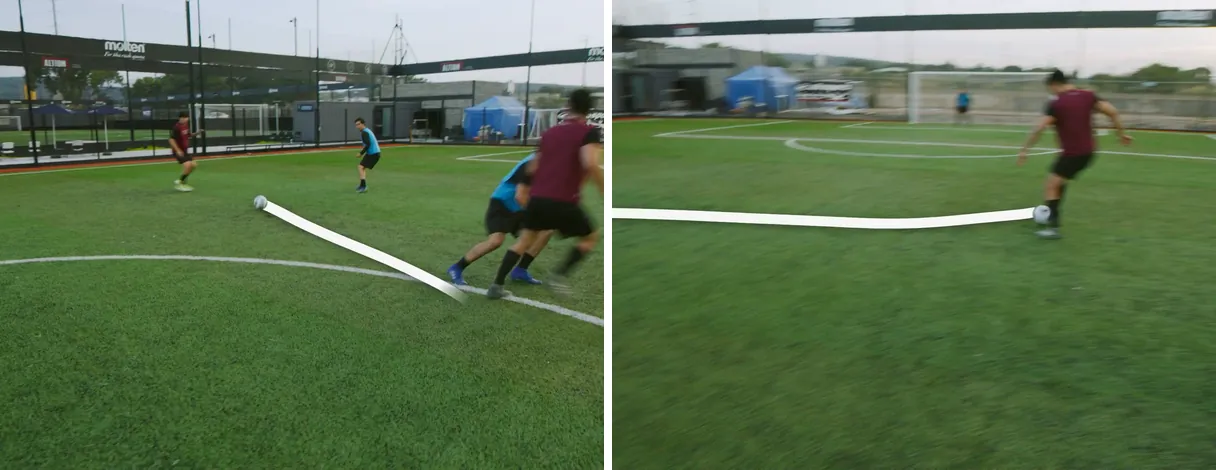
One trail per strike, not one single line
The trail begins at the strike, follows the ball through its flight and fades softly at the next touch. A long pass, a shot then a follow-up, a run of keepy-uppies: every send-off of the ball gets its own arc, and the screen stays readable from the start of the clip to the end.
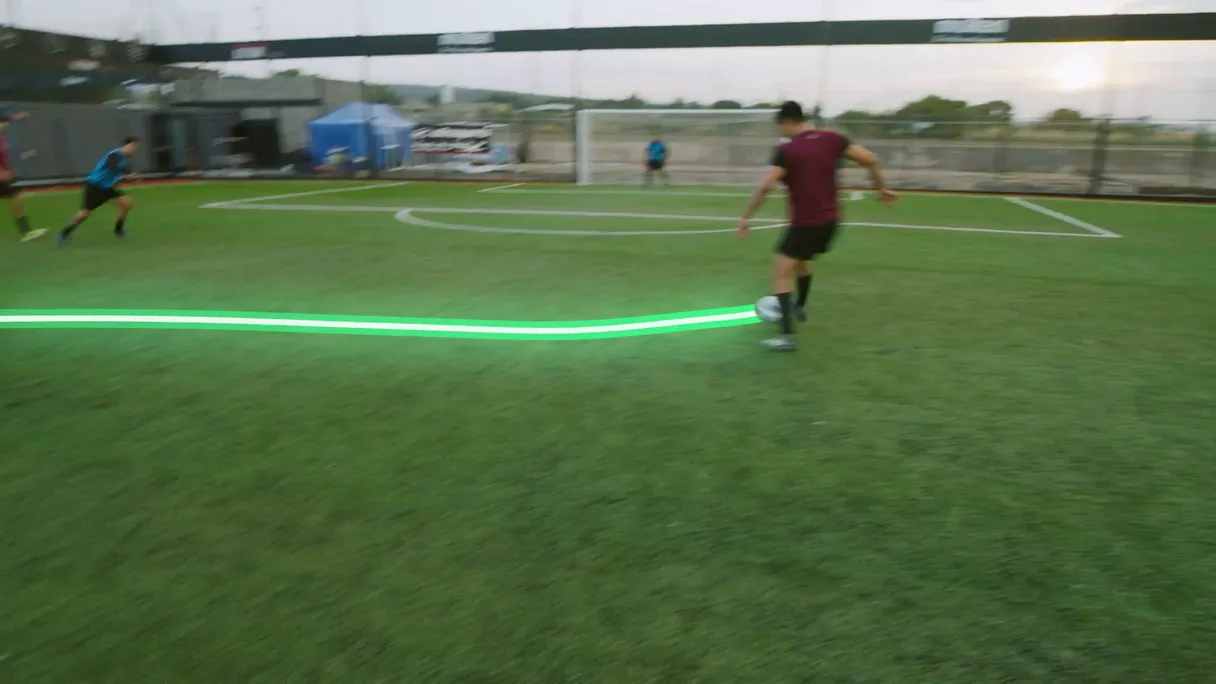
A trail that stays glued to the pitch
Your phone follows the action by hand and the picture moves? The trail does not slide along with it: it stays attached to the pitch, as though it had been laid on the grass. The ball always passes in front of its trail, which gives that broadcast look.
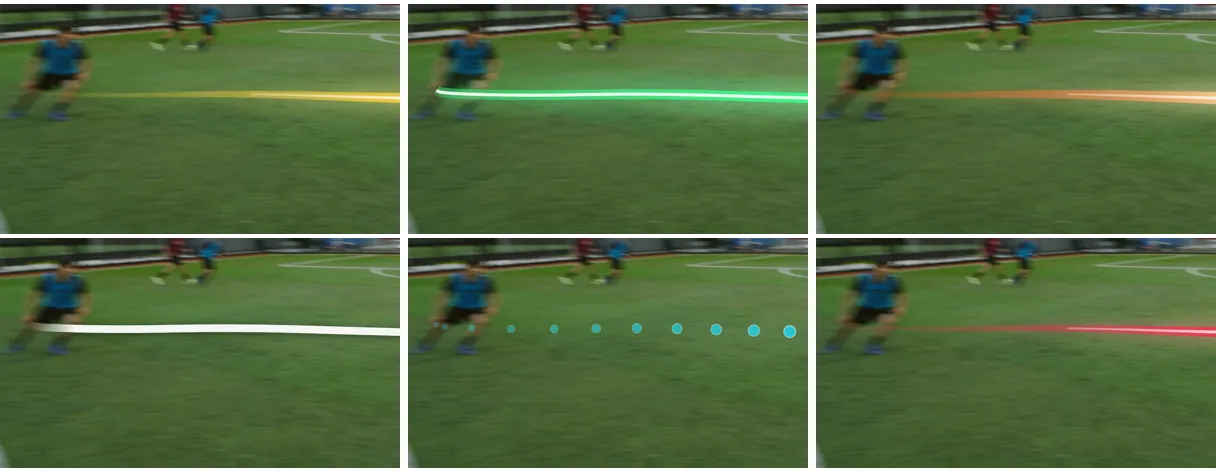
Five styles tuned live
Comet, Neon, Fire, TV or Ghost balls: change the style, colour, thickness or trail length and see the effect on the preview that very moment. Eight colours are ready to go, and a custom colour lets you match your team's.
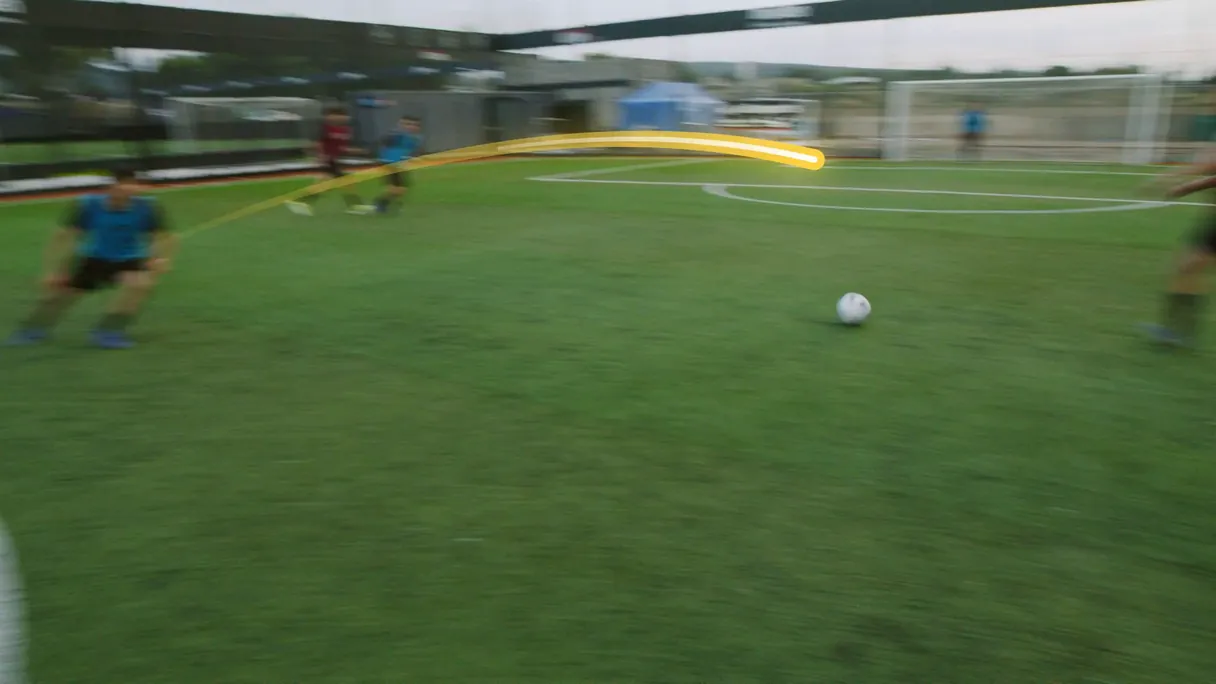
Every shot in your hands
Three handles, at the start, the top and the end, let you redraw the curve of each shot. Remove a shot with one click, add one at the moment you want: the trail in the downloaded video is exactly the one you composed on screen.
What players and coaches trace
A filmed penalty or free kick
You filmed the strike from the touchline. Add the trail of the ball all the way to the net and keep the result for the team chat or for yourself.
A weekend match highlight
Long passes, crosses, shots from distance: each key moment draws its arc, and you get a sequence that is enjoyable even for someone who did not see the game.
Keepy-uppies or a skill challenge
Every touch leaves its small curve: the trail shows off the control of the move and makes the video far more striking from the first seconds.
A training session to review
Coaches and players replay a strike or a pass to look at the shape of the curve, with a clean trail that is easy to follow at a glance.
The best goal of the season
A lob, a volley, a curled shot from the edge of the box: trace the goal, pick your club colours and publish a keepsake of the goal that really looks the part.
Related Tools
Ball tracer: your questions
Is there a free ball tracer for a soccer video?
Yes: your first try is free, with no signup. You set up the trail and watch it on your own clip before deciding anything. The video downloads with the Klipa logo; without the logo with a Pass or a Pro plan.
How do I add a ball trail to a video?
Upload your football video. The tool finds the ball frame by frame and draws the path of each shot, from the strike to the next touch. You then pick the style, colour, thickness and trail length, and download the MP4.
Do I need to install an app to trace the ball?
There's no app to install. Everything happens in the browser, on a computer or on a phone: you upload the video, set the trail on the preview and download the result. Nothing to install, nothing to configure before you begin: the trail is set directly on the preview of your video, with a finger or a mouse.
Does the trail work on a ball filmed by hand on a phone?
Yes. When your phone follows the action and the picture moves, the trail stays glued to the pitch instead of sliding with the picture. The ball stays visible in front of its trail, as in a match broadcast.
Which trail styles can I choose?
Five: “Comet”, a trail that thins out behind the ball; “Neon”, a glowing line; “Fire”, a trail that heats up towards white; “TV”, a crisp line with a shadow; “Ghost balls”, a string of dots. Eight colours are ready, plus a custom colour.
Can I edit the path of a shot by hand?
Yes. Three handles you drag on the preview, at the start, the top and the end, redraw the curve of the shot. You can also remove a shot with one click or add one at the moment you want, then set it with the same handles.
Does every pass and every shot get its own trail?
Yes. A trail begins at each strike, follows the ball during its flight and fades softly at the next touch. Passes, shots and keepy-uppy touches each draw their own arc, which keeps the picture readable throughout the clip, even when the shots come one after another.
Is the crowd noise from my match footage kept after tracing?
The original sound is kept: the crowd, the makeshift commentary, the whistle and the cheers. The traced video comes back as an MP4, ready to publish, share with the team chat or keep for yourself, with the whole atmosphere of the pitch intact.
My match recording is long: can I trace only the minute of the goal?
Yes. For a long video you choose the one-minute passage to trace, for example the minute of the goal. If you want to keep only the action before tracing, the video cutter does it in a few seconds, before you start the trace.
Which file types work for my football clip?
The usual formats from phones and cameras: MP4, MOV, WebM, AVI and MKV, plus 3GP, FLV and WMV. The traced video comes back as an MP4, with its original sound, ready to publish or send as it is, on a phone or a computer.
Draw the path of your next shot
Upload the video, set the style live and watch the trail of the ball before you pay anything.
No credit card required
The move, then its curve in plain sight
A great strike deserves to have its curve seen. With the ball tracer, the path is drawn without touching up frame by frame, in the style and colour you pick. To make the move stand out, first put the strike in slow motion with the slow motion tool, or keep only the action with the video cutter, then trace the ball on the sequence you get. Each tool starts again from the video you just made, and you stay in control of the style, colour and trail length right up to the final download.
